<?xml version="1.0" encoding="utf-8"?><feed xmlns="http://www.w3.org/2005/Atom" ><generator uri="https://jekyllrb.com/" version="4.2.2">Jekyll</generator><link href="/feed.xml" rel="self" type="application/atom+xml" /><link href="/" rel="alternate" type="text/html" /><updated>2024-08-16T17:01:39+08:00</updated><id>/feed.xml</id><subtitle>Write an awesome description for your new site here. You can edit this line in _config.yml. It will appear in your document head meta (for Google search results) and in your feed.xml site description.</subtitle><author><name>GitHub User</name></author><entry><title type="html">字体导入教程</title><link href="/2022/01/01/import-help-zh-an.html" rel="alternate" type="text/html" title="字体导入教程" /><published>2022-01-01T00:00:00+08:00</published><updated>2022-01-01T00:00:00+08:00</updated><id>/2022/01/01/import-help-zh-an</id><content type="html" xml:base="/2022/01/01/import-help-zh-an.html"><![CDATA[<h1 id="字体导入教程">字体导入教程</h1>
<p>• 注意：目前练字大师APP只支持导入.ttf格式的字体文件</p>
<h2 id="-浏览器下载字体">• 浏览器下载字体：</h2>
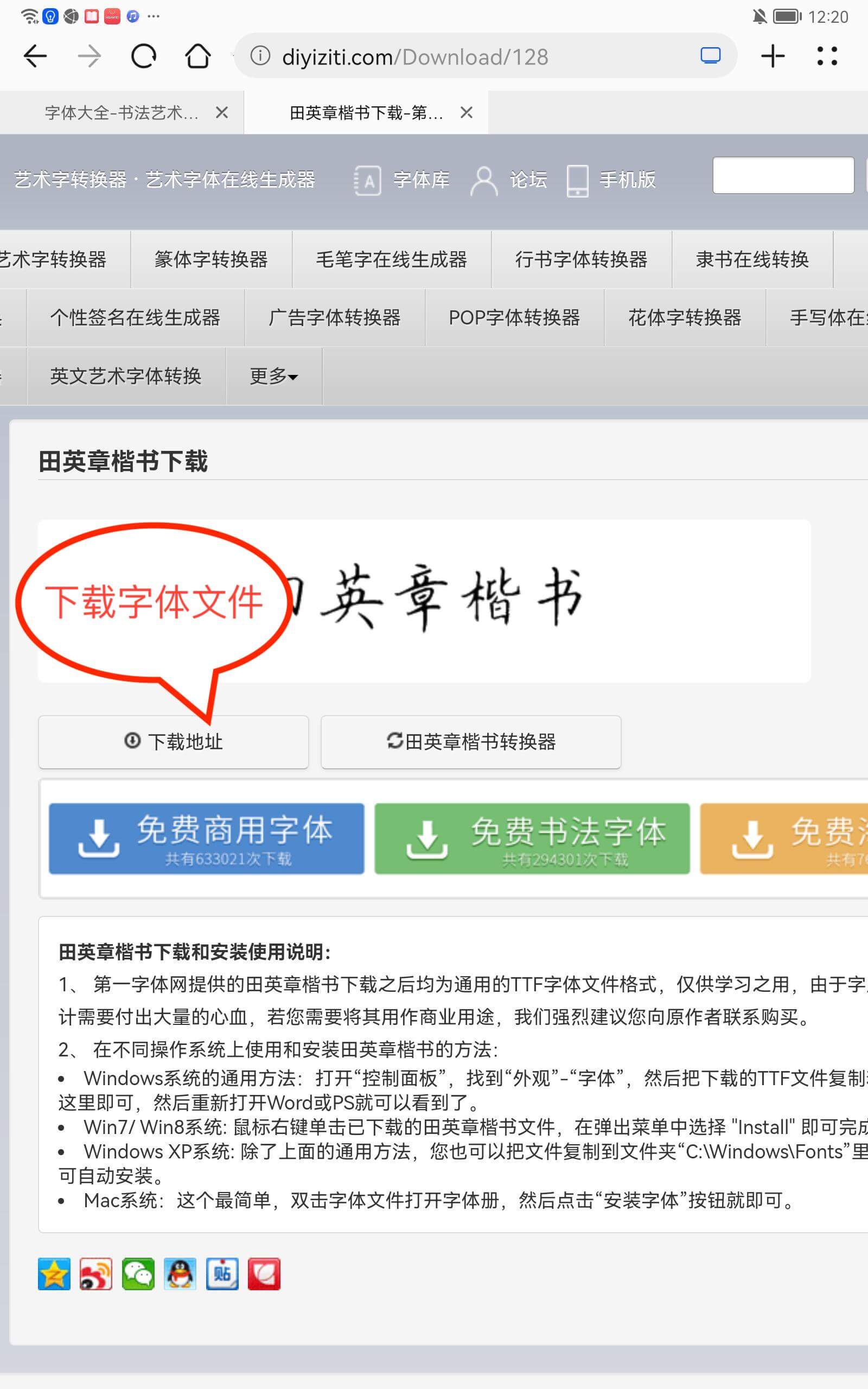
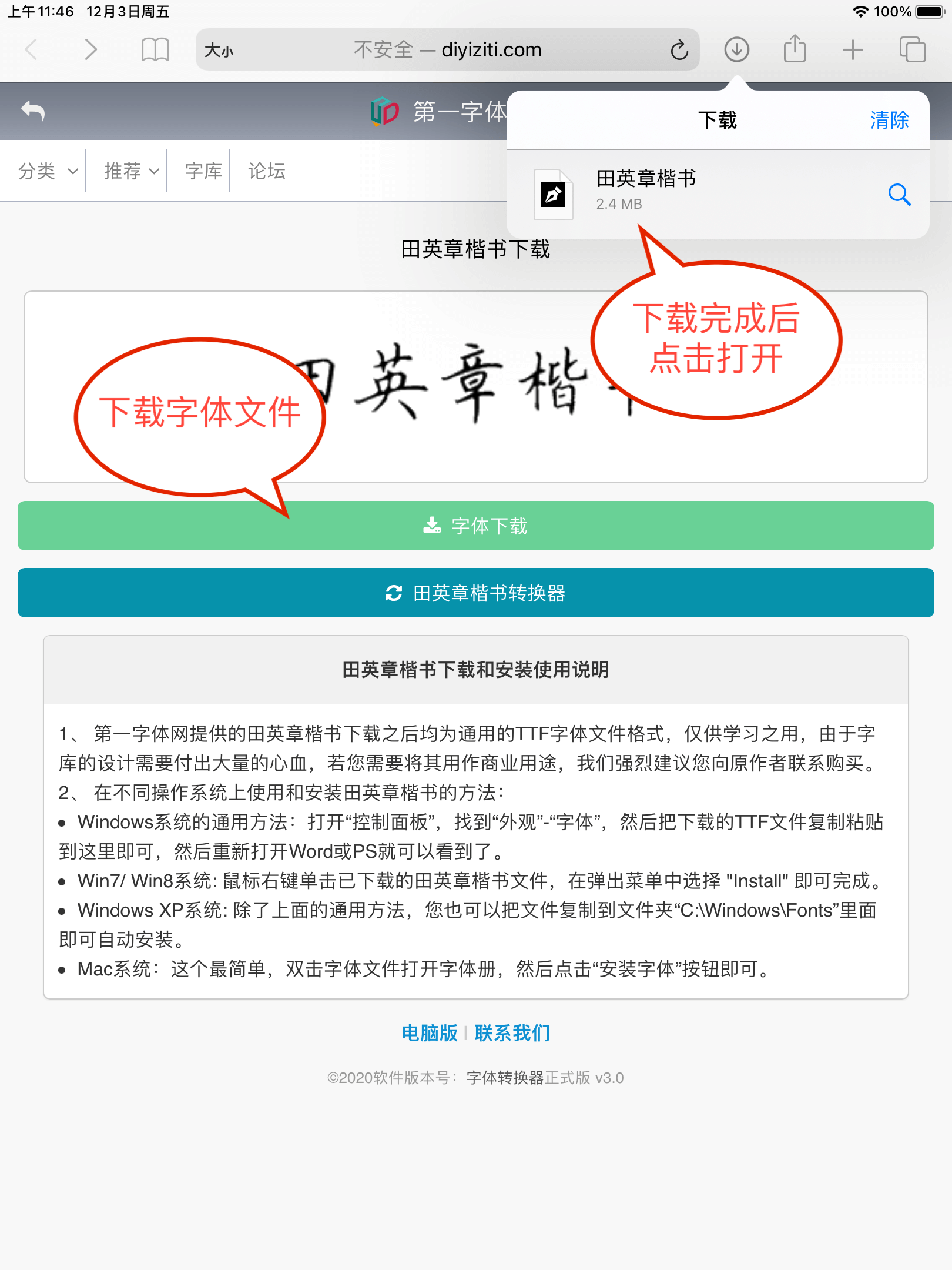
<h3 id="第一步浏览器访问任意字体资源网站下载字体文件">第一步，浏览器访问任意字体资源网站，下载字体文件</h3>

<p><img src="https://pjresource-1256940591.cos.ap-shanghai.myqcloud.com/importHelpAn/an_help_1.jpeg" alt="exmaple.png" /></p>

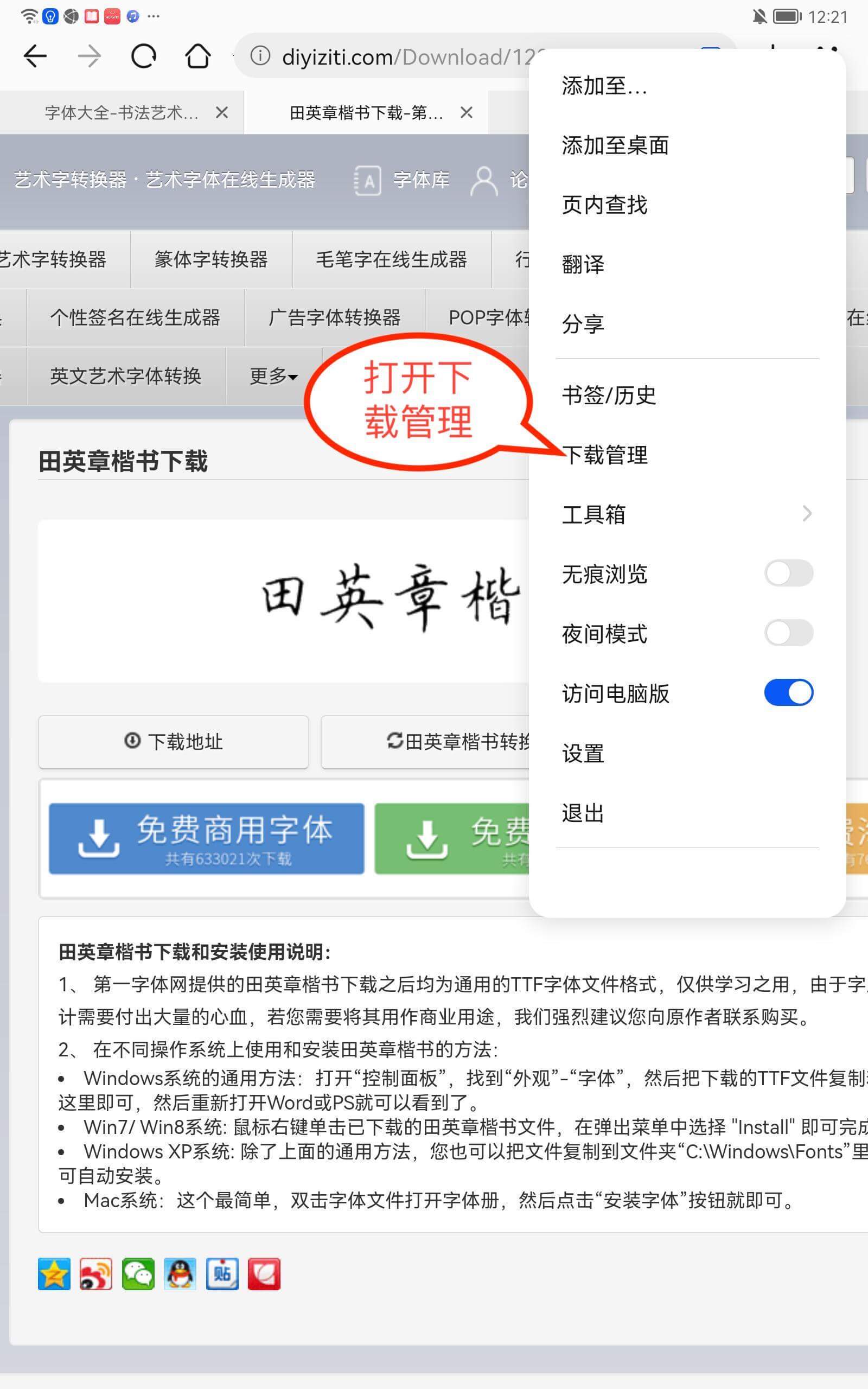
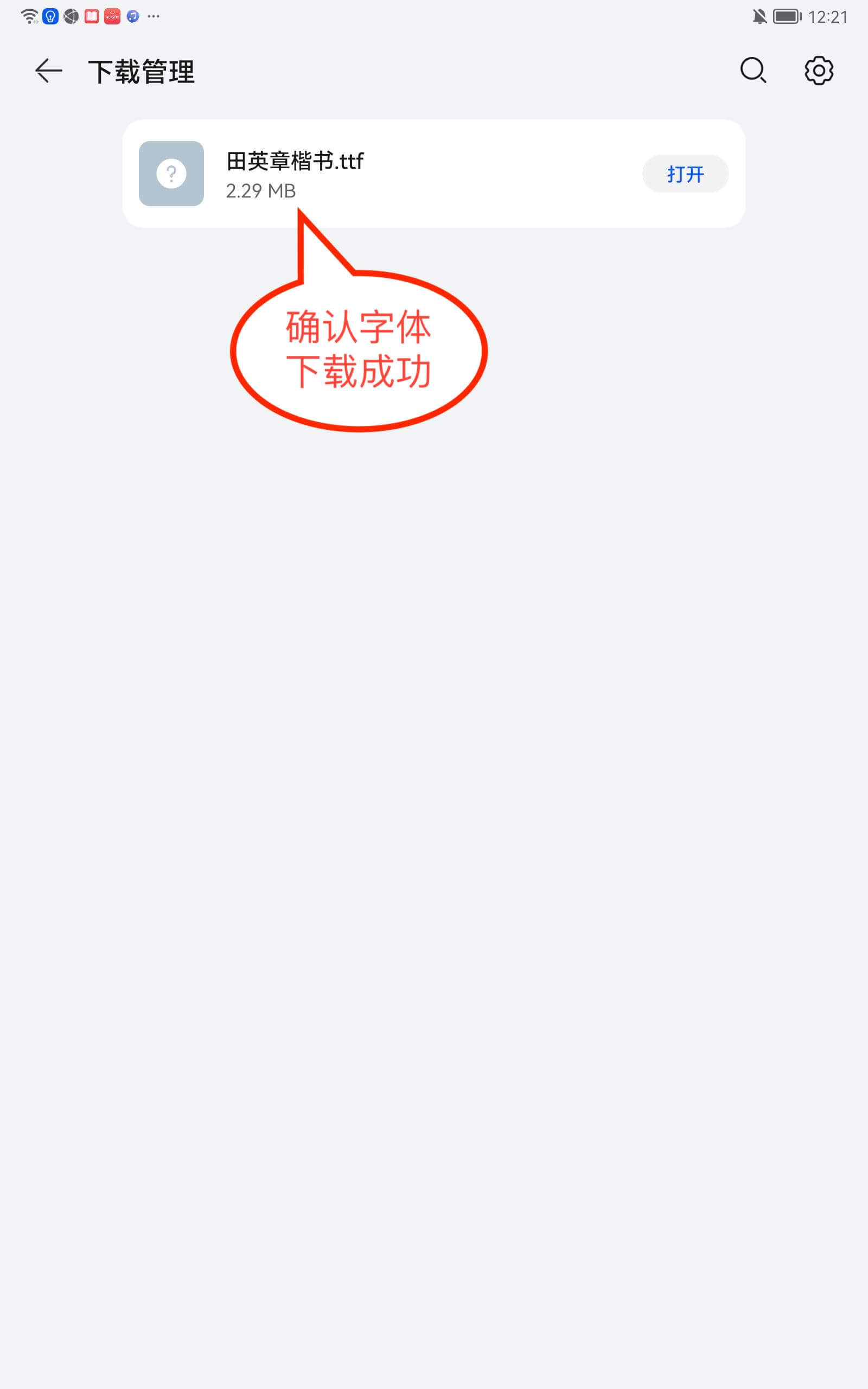
<p>打开浏览器的下载管理，确认字体下载成功</p>

<p><img src="https://pjresource-1256940591.cos.ap-shanghai.myqcloud.com/importHelpAn/an_help_2.jpeg" alt="exmaple.png" /></p>

<p><img src="https://pjresource-1256940591.cos.ap-shanghai.myqcloud.com/importHelpAn/an_help_3.jpeg" alt="exmaple.png" /></p>

<h3 id="第二步用练字大师app导入字体">第二步，用练字大师APP导入字体</h3>

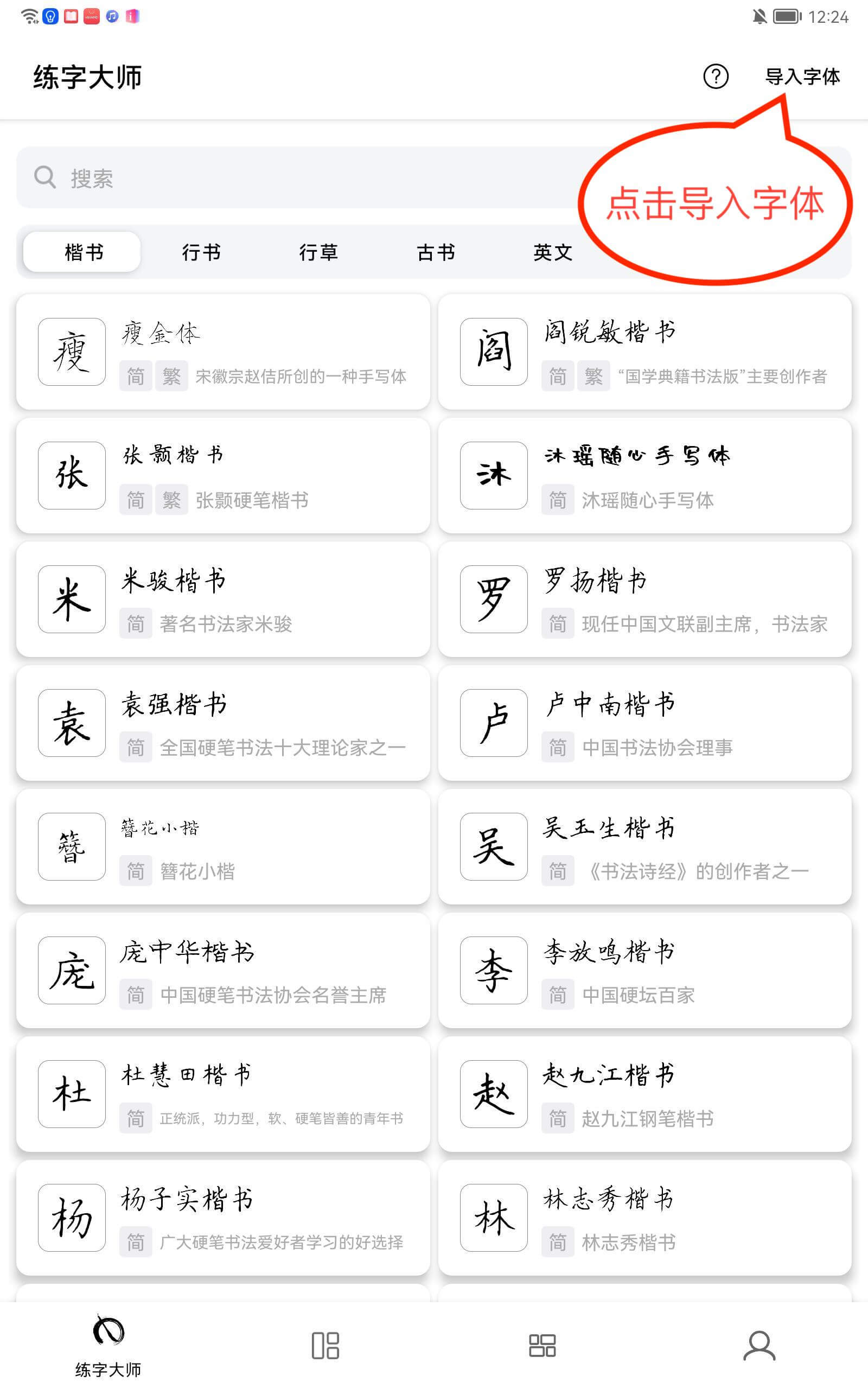
<p>打开练字大师APP，点击首页右上方的 <strong>“导入字体”</strong> 按钮</p>

<p><img src="https://pjresource-1256940591.cos.ap-shanghai.myqcloud.com/importHelpAn/an_help_4.jpeg" alt="exmaple.png" /></p>

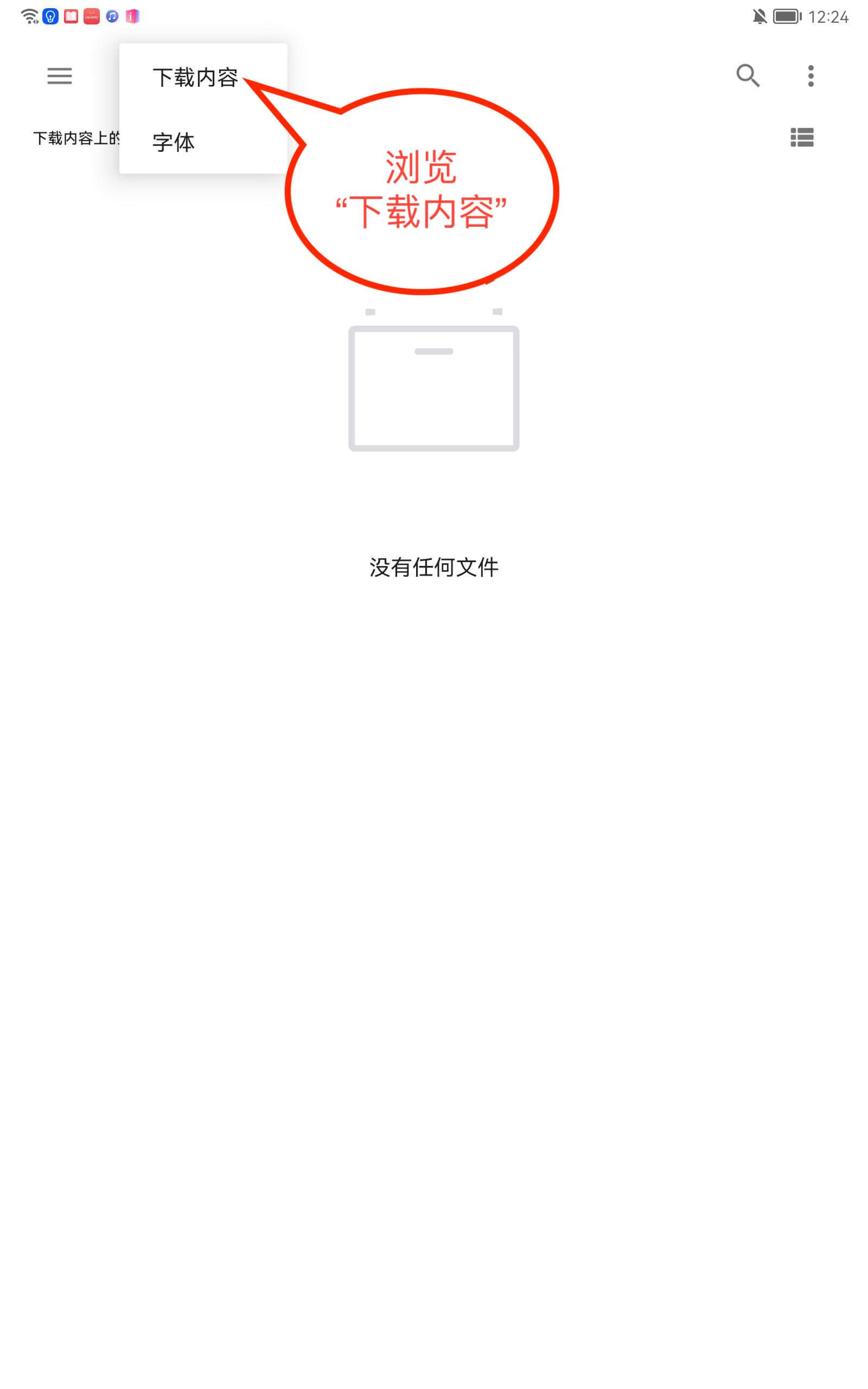
<p>浏览 <strong>“下载内容”</strong></p>

<p><img src="https://pjresource-1256940591.cos.ap-shanghai.myqcloud.com/importHelpAn/an_help_5.jpeg" alt="exmaple.png" /></p>

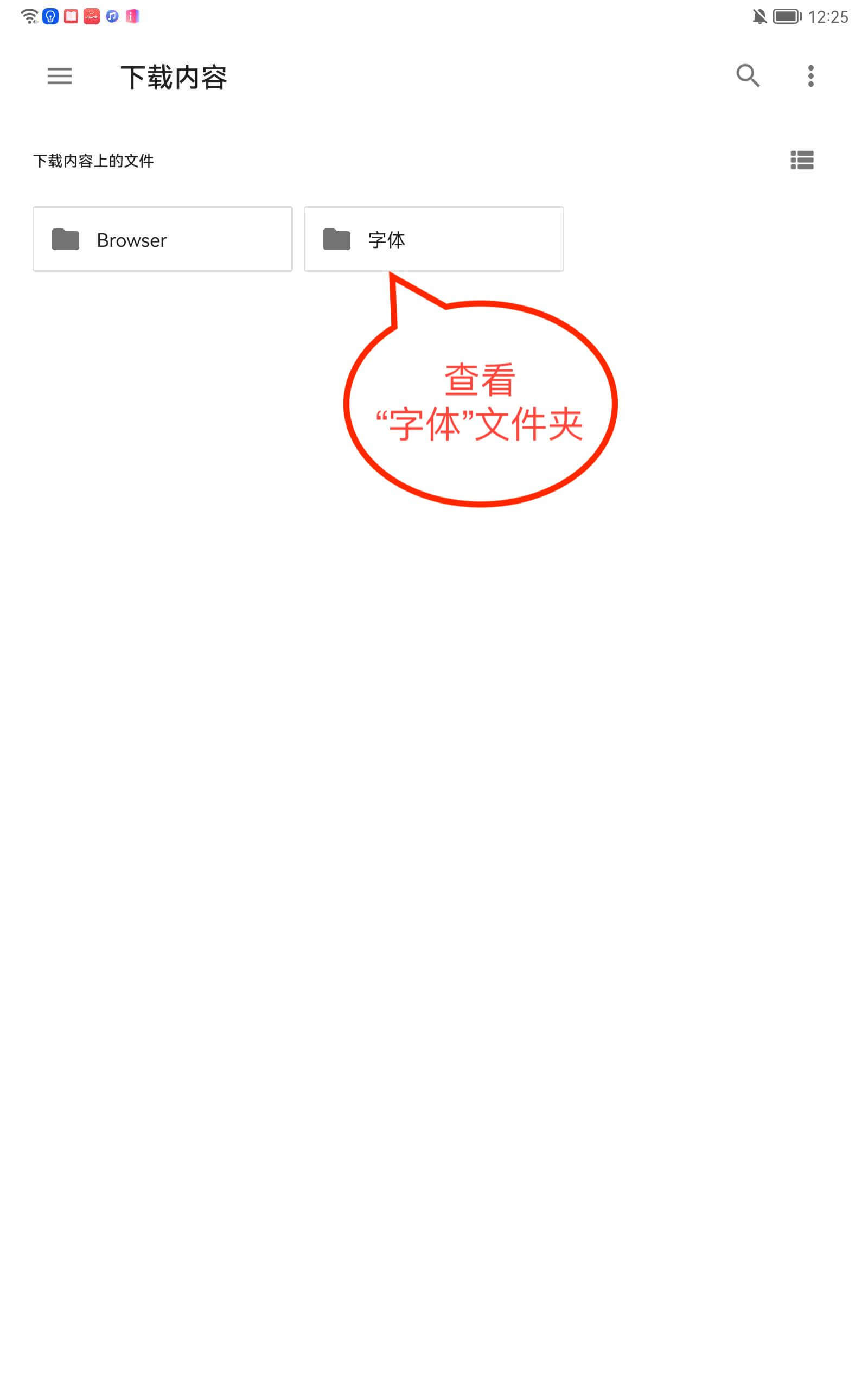
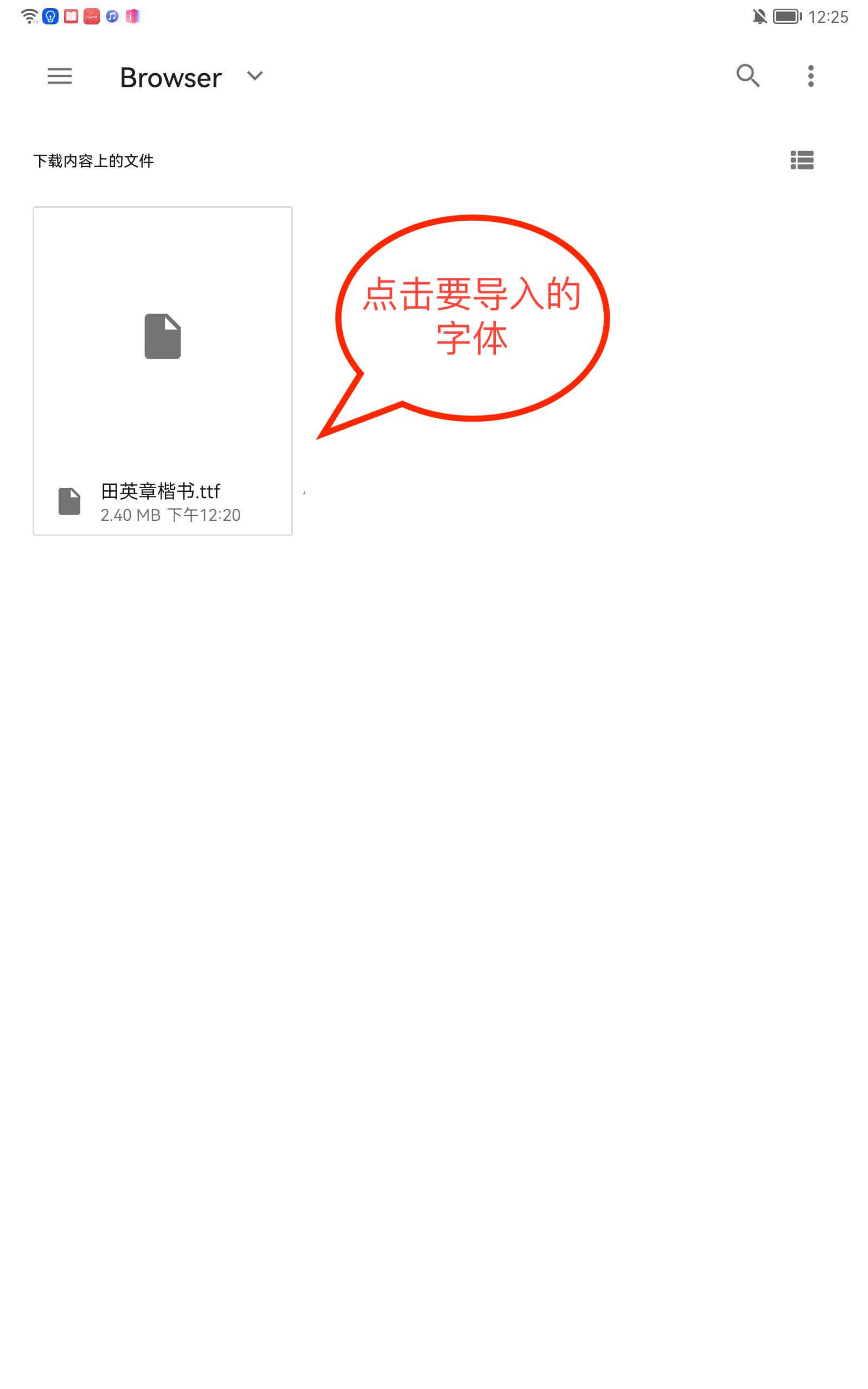
<p>查看“字体”文件夹，找到要导入的字体</p>

<p><img src="https://pjresource-1256940591.cos.ap-shanghai.myqcloud.com/importHelpAn/an_help_6.jpeg" alt="exmaple.png" /></p>

<p><img src="https://pjresource-1256940591.cos.ap-shanghai.myqcloud.com/importHelpAn/an_help_7.jpeg" alt="exmaple.png" /></p>

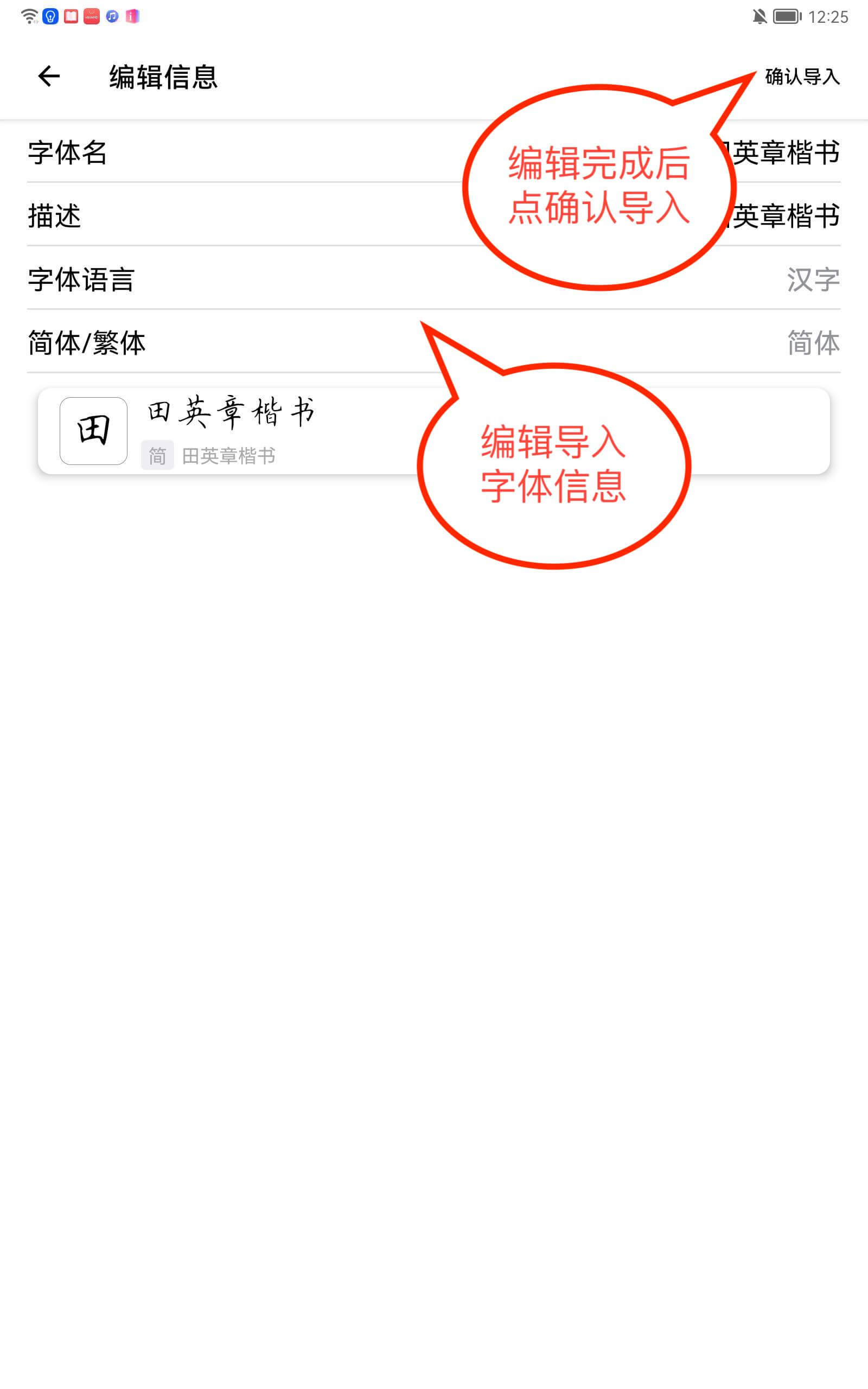
<h3 id="第三步编辑字体信息">第三步，编辑字体信息</h3>

<p>编辑导入字体的信息，并 <strong>“确认导入”</strong></p>

<p><img src="https://pjresource-1256940591.cos.ap-shanghai.myqcloud.com/importHelpAn/an_help_8.jpeg" alt="exmaple.png" /></p>

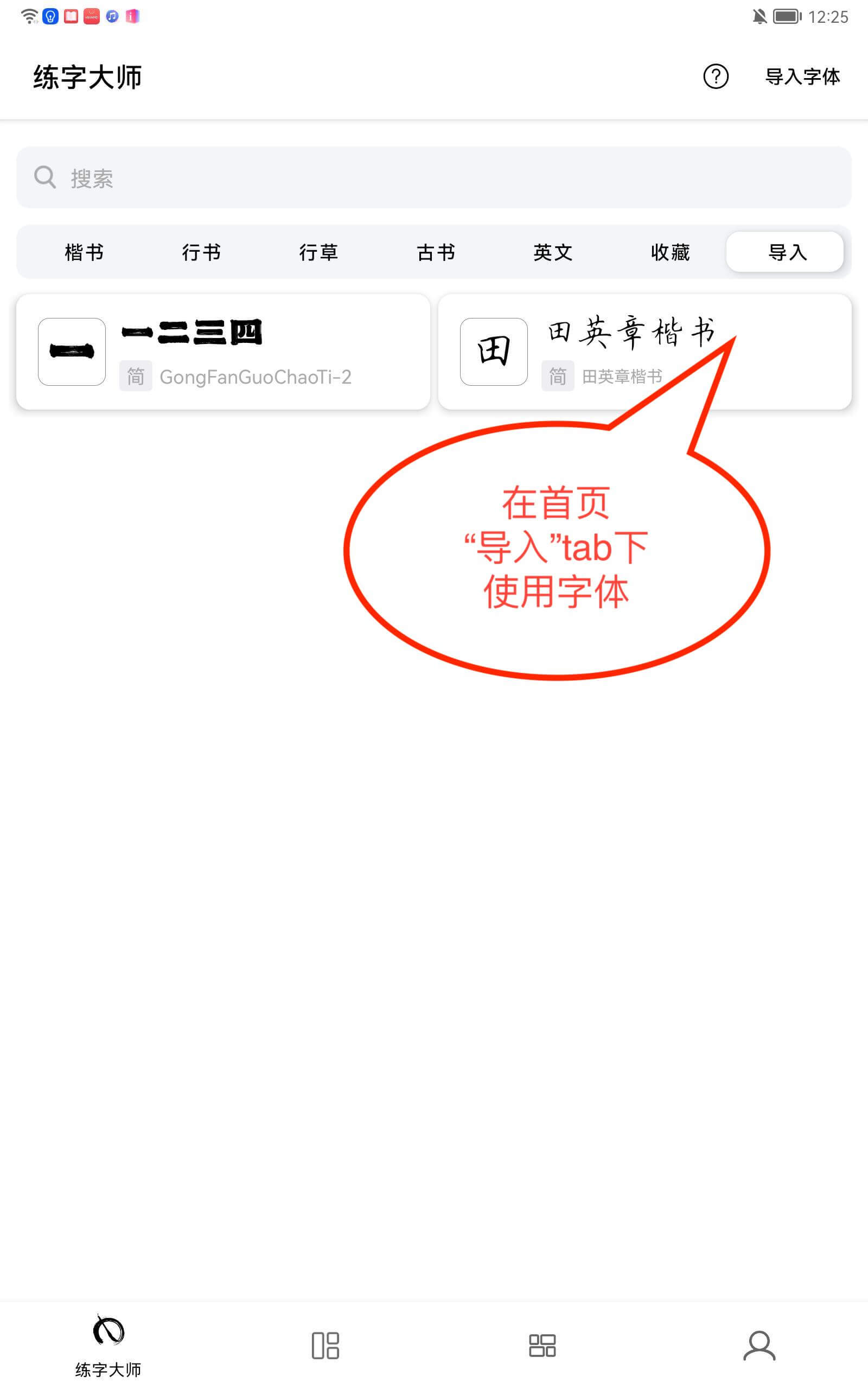
<p>导入成功后，在练字大师首页 <strong>“导入”</strong> 页面查看并使用导入的字体</p>

<p><img src="https://pjresource-1256940591.cos.ap-shanghai.myqcloud.com/importHelpAn/an_help_9.jpeg" alt="exmaple.png" /></p>]]></content><author><name>GitHub User</name></author><summary type="html"><![CDATA[字体导入教程 • 注意：目前练字大师APP只支持导入.ttf格式的字体文件 • 浏览器下载字体： 第一步，浏览器访问任意字体资源网站，下载字体文件]]></summary></entry><entry><title type="html">Font Import Tutorial</title><link href="/2021/12/09/import-help-en.html" rel="alternate" type="text/html" title="Font Import Tutorial" /><published>2021-12-09T00:00:00+08:00</published><updated>2021-12-09T00:00:00+08:00</updated><id>/2021/12/09/import-help-en</id><content type="html" xml:base="/2021/12/09/import-help-en.html"><![CDATA[<h1 id="font-import-tutorial">Font Import Tutorial</h1>
<p>• Caution: The App currently only supports importing fonts in <strong>.ttf</strong> format</p>
<h2 id="-download-fonts-via-browser">• Download fonts via browser:</h2>
<h3 id="step-1-open-any-font-website-and-download-the-desired-font-file">Step 1: Open any font website and download the desired font file</h3>

<p><img src="https://calligraphymasteren.s3.us-east-2.amazonaws.com/lzds_tips/calligraphy_1.jpeg" alt="exmaple.png" /></p>

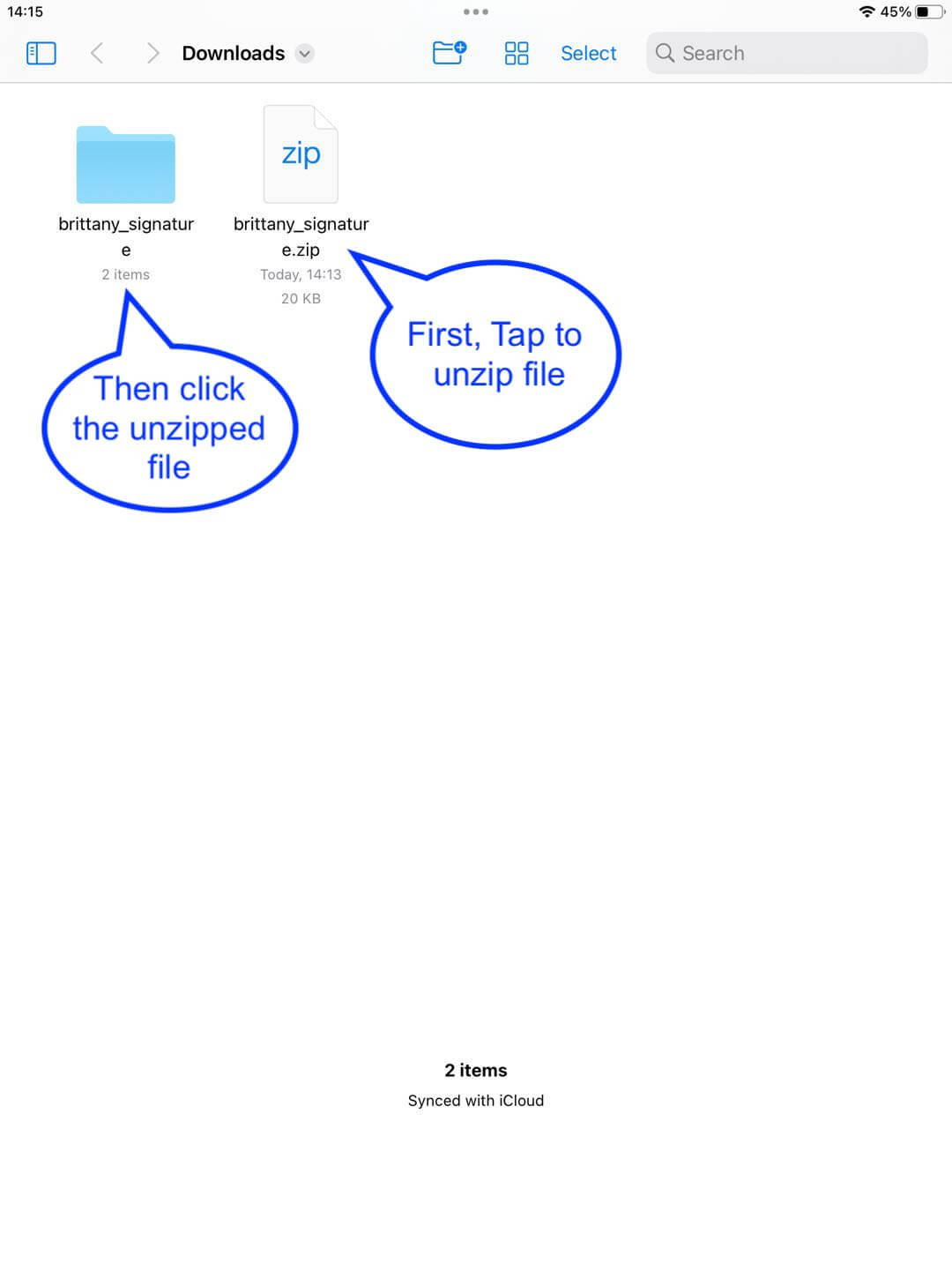
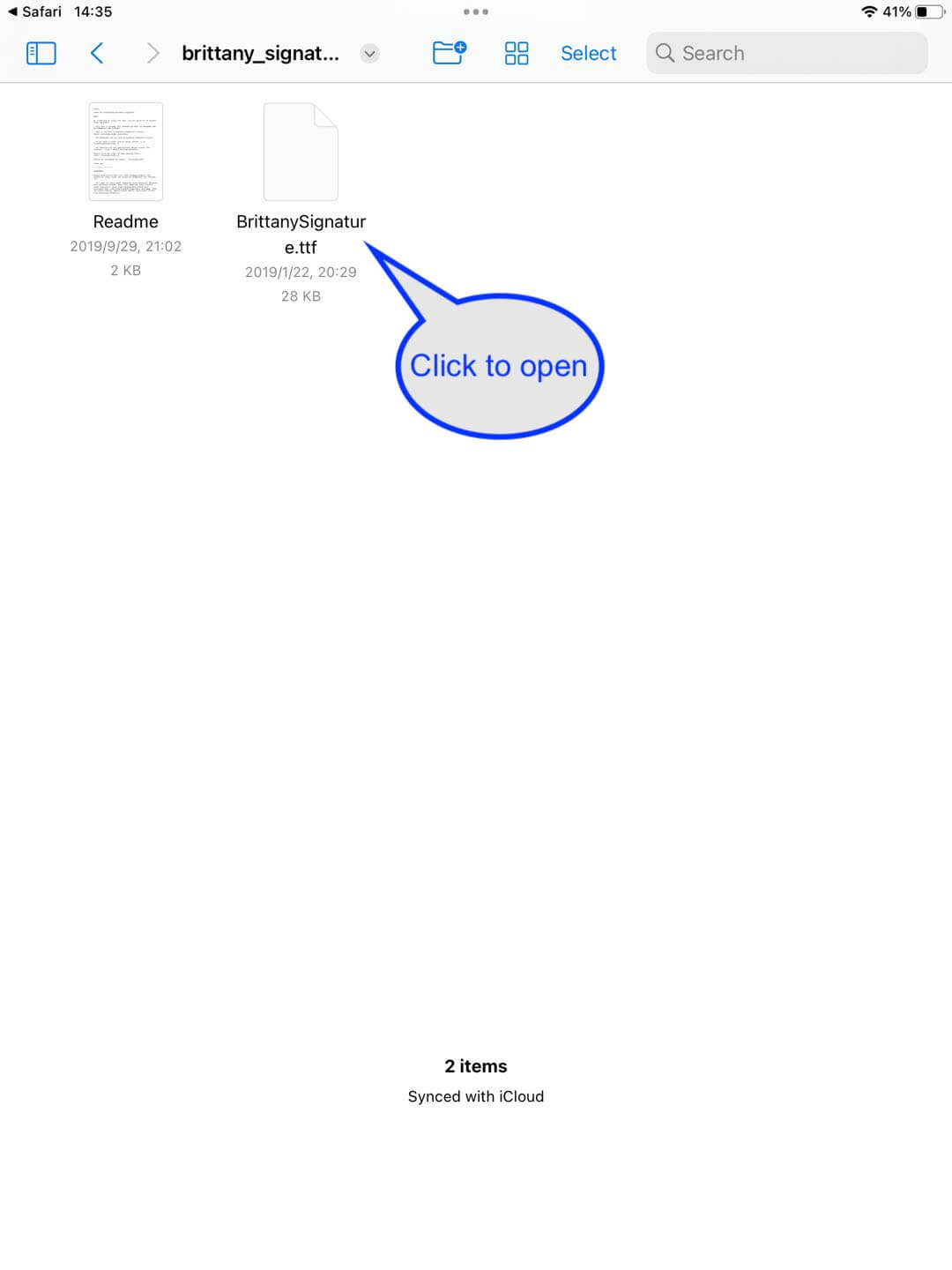
<p>The system will use <strong>“File” APP</strong> to open it, if the downloaded file is a zip archive, the system will unzip it, then navigate to the unzipped directory</p>

<p><img src="https://calligraphymasteren.s3.us-east-2.amazonaws.com/lzds_tips/calligraphy_2.jpeg" alt="exmaple.png" /></p>

<h3 id="step-2-open-the-font-file-with-calligraphy-master-app">Step 2: Open the font file with Calligraphy Master App</h3>

<p><img src="https://calligraphymasteren.s3.us-east-2.amazonaws.com/lzds_tips/calligraphy_3.jpeg" alt="exmaple.png" /></p>

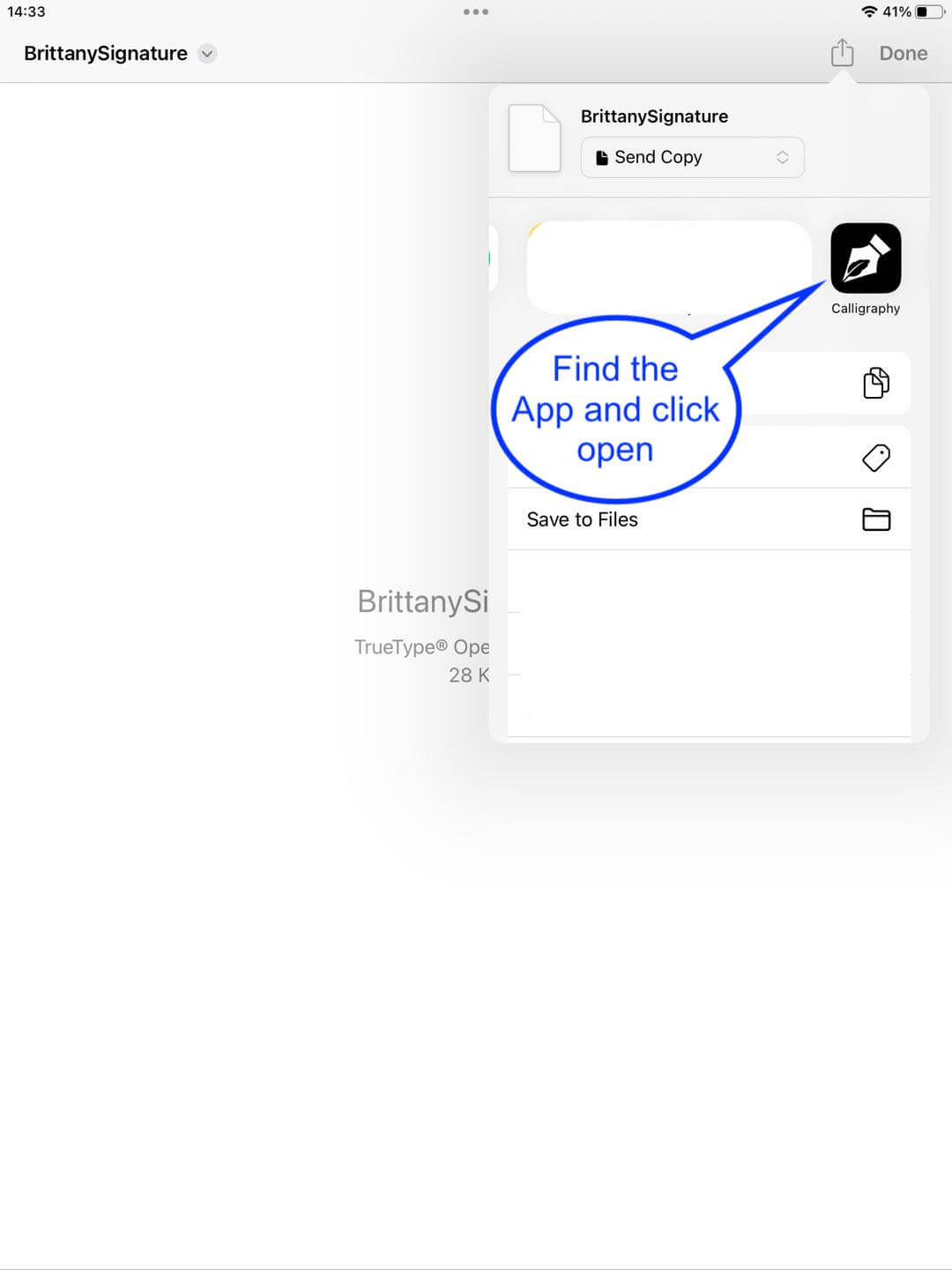
<p>In the upper right corner of the menu to find the <strong>Master App</strong></p>

<p><img src="https://calligraphymasteren.s3.us-east-2.amazonaws.com/lzds_tips/calligraphy_4.jpeg" alt="exmaple.png" /></p>

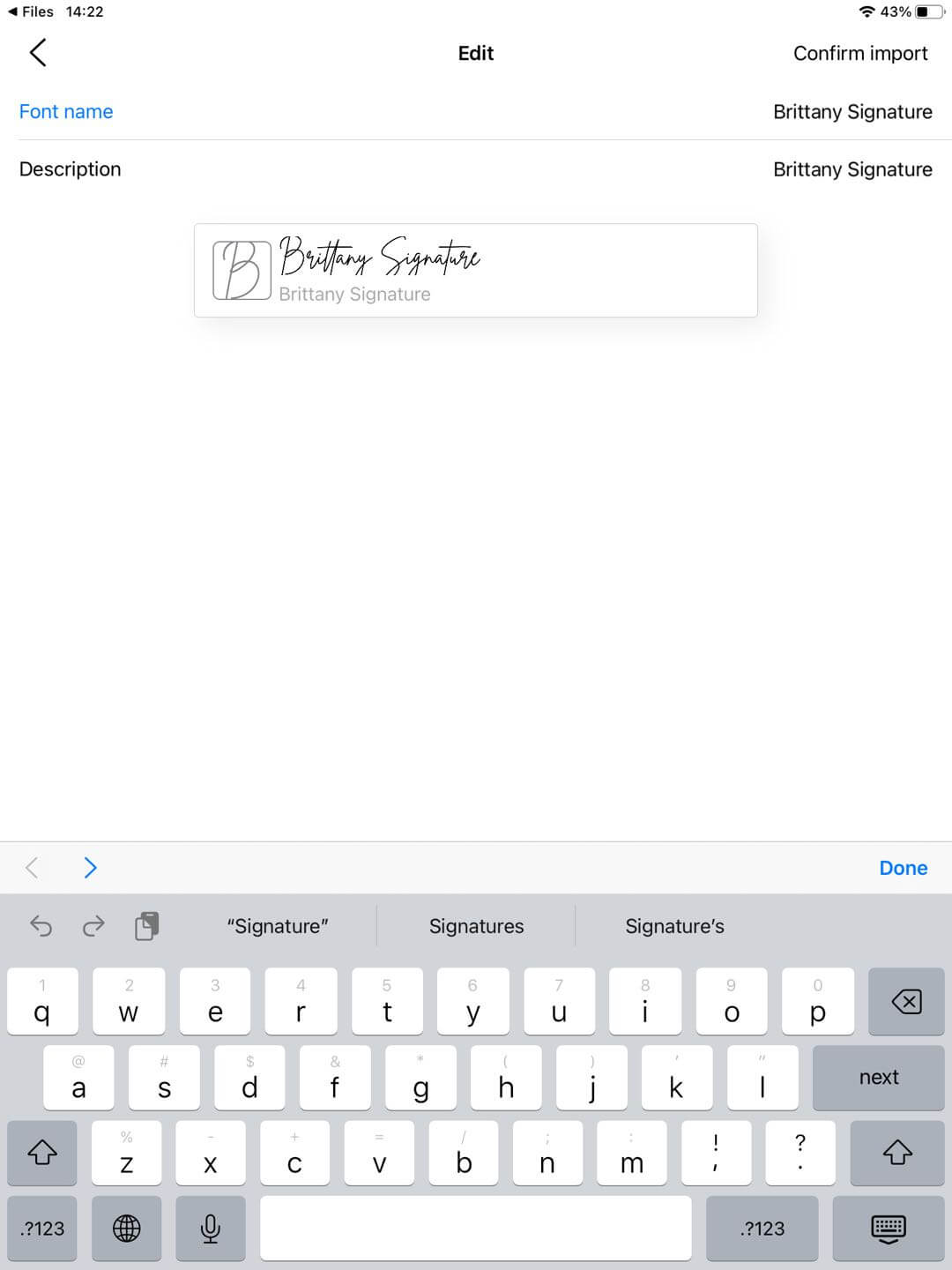
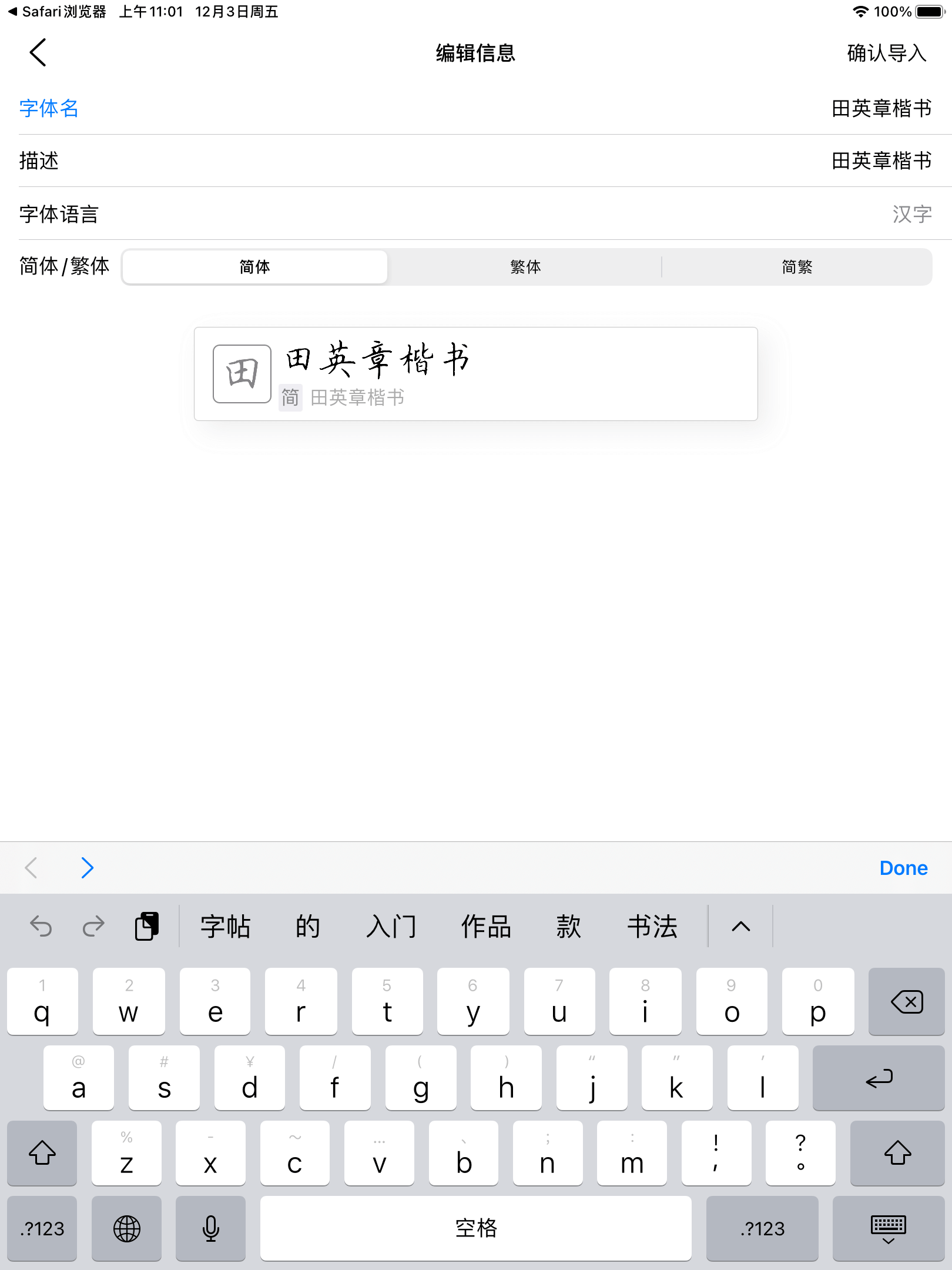
<h3 id="step-3-edit-the-font">Step 3: Edit the font</h3>

<p>After loading the font file, you will be directed to teh editing page</p>

<p><img src="https://calligraphymasteren.s3.us-east-2.amazonaws.com/lzds_tips/calligraphy_5.jpeg" alt="exmaple.png" /></p>

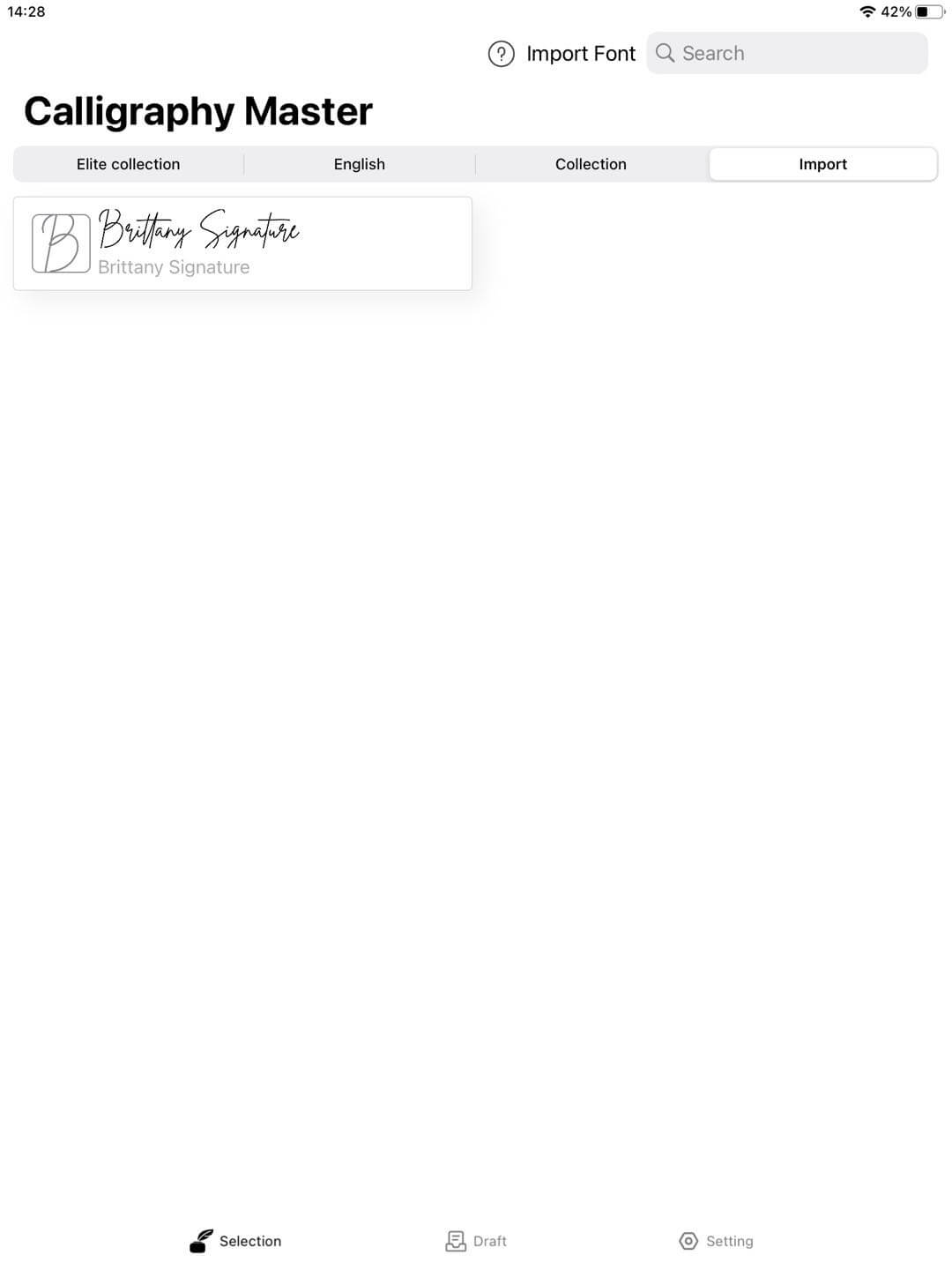
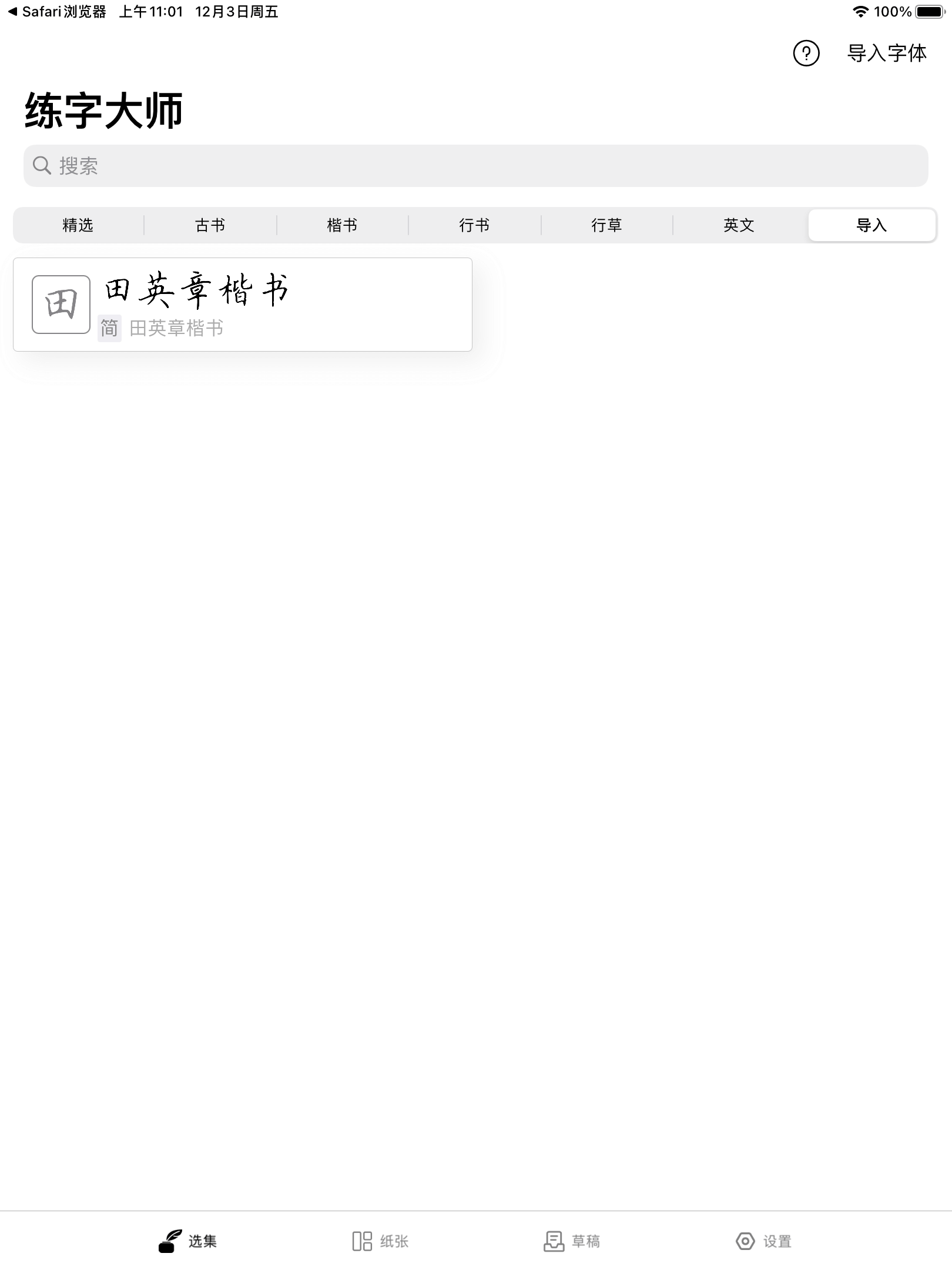
<p>After editing, click <strong>[Confirm Import]</strong> and return to the home page to view your imported font</p>

<p><img src="https://calligraphymasteren.s3.us-east-2.amazonaws.com/lzds_tips/calligraphy_6.jpeg" alt="exmaple.png" /></p>

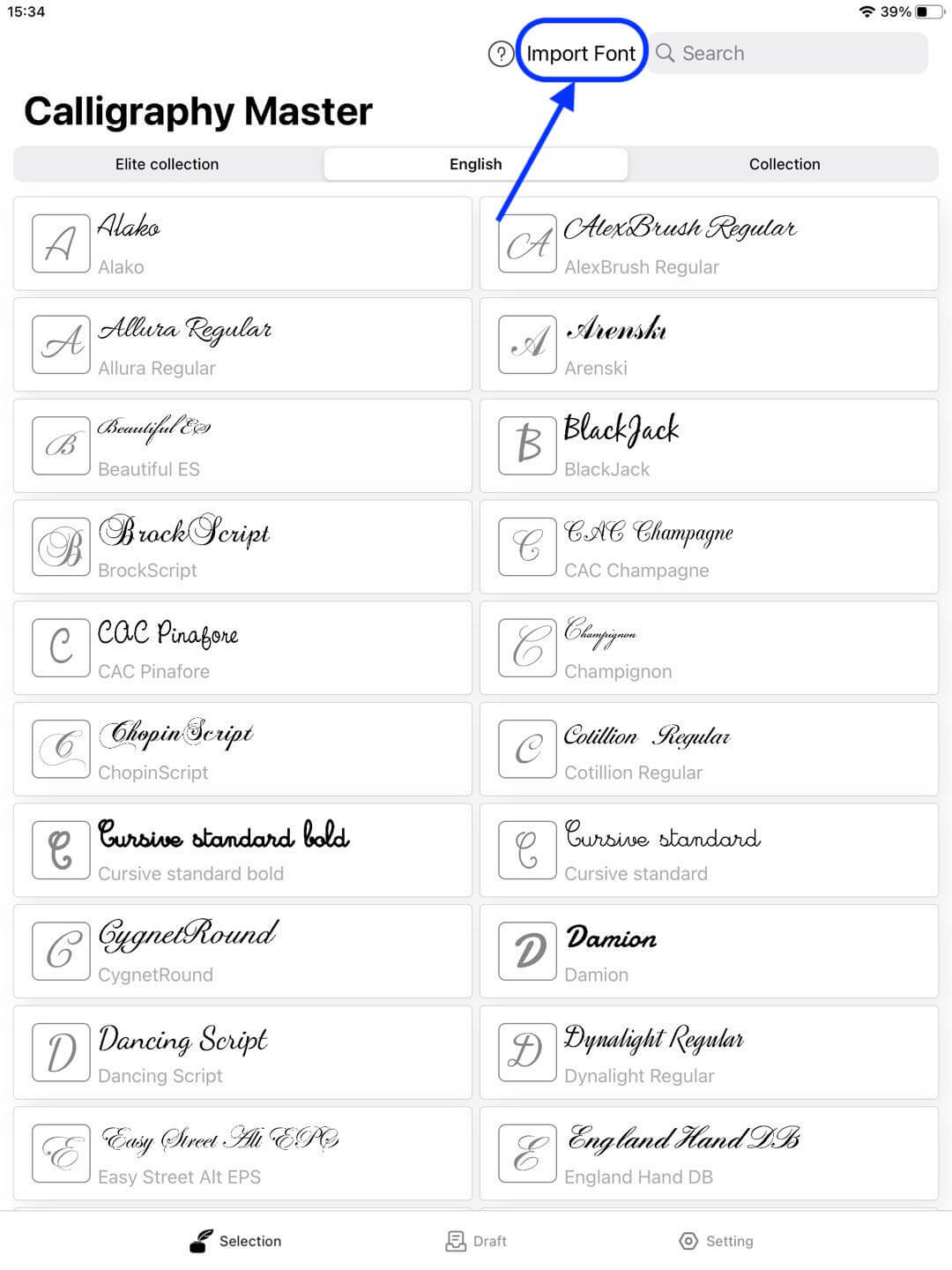
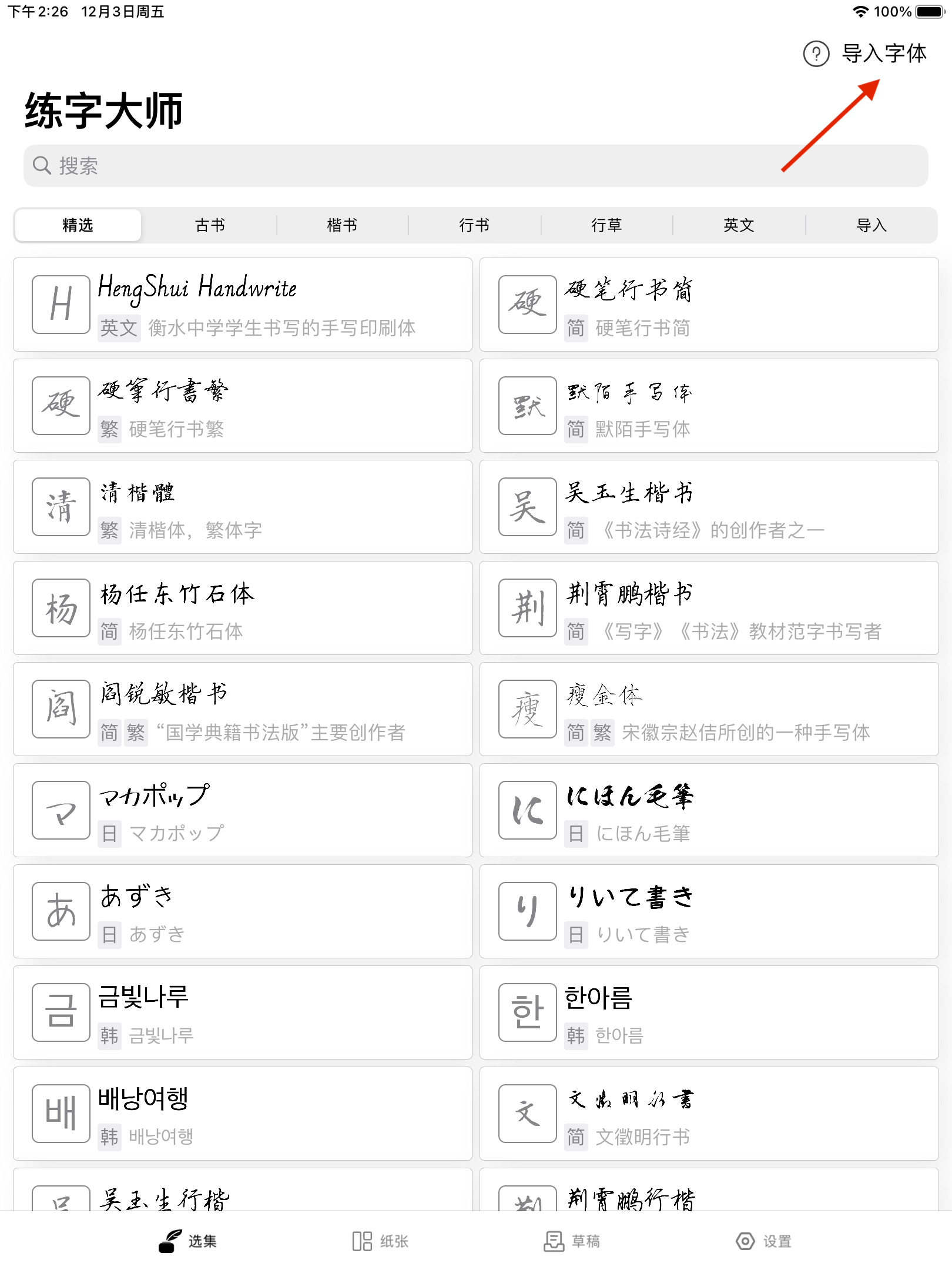
<h2 id="-you-can-access-any-existing-ttf-font-files-via-the-app">• You can access any existing <strong>.ttf</strong> font files via the app</h2>

<p>Click to <strong>import fonts</strong>
<img src="https://calligraphymasteren.s3.us-east-2.amazonaws.com/lzds_tips/calligraphy_7.jpeg" alt="exmaple.png" /></p>

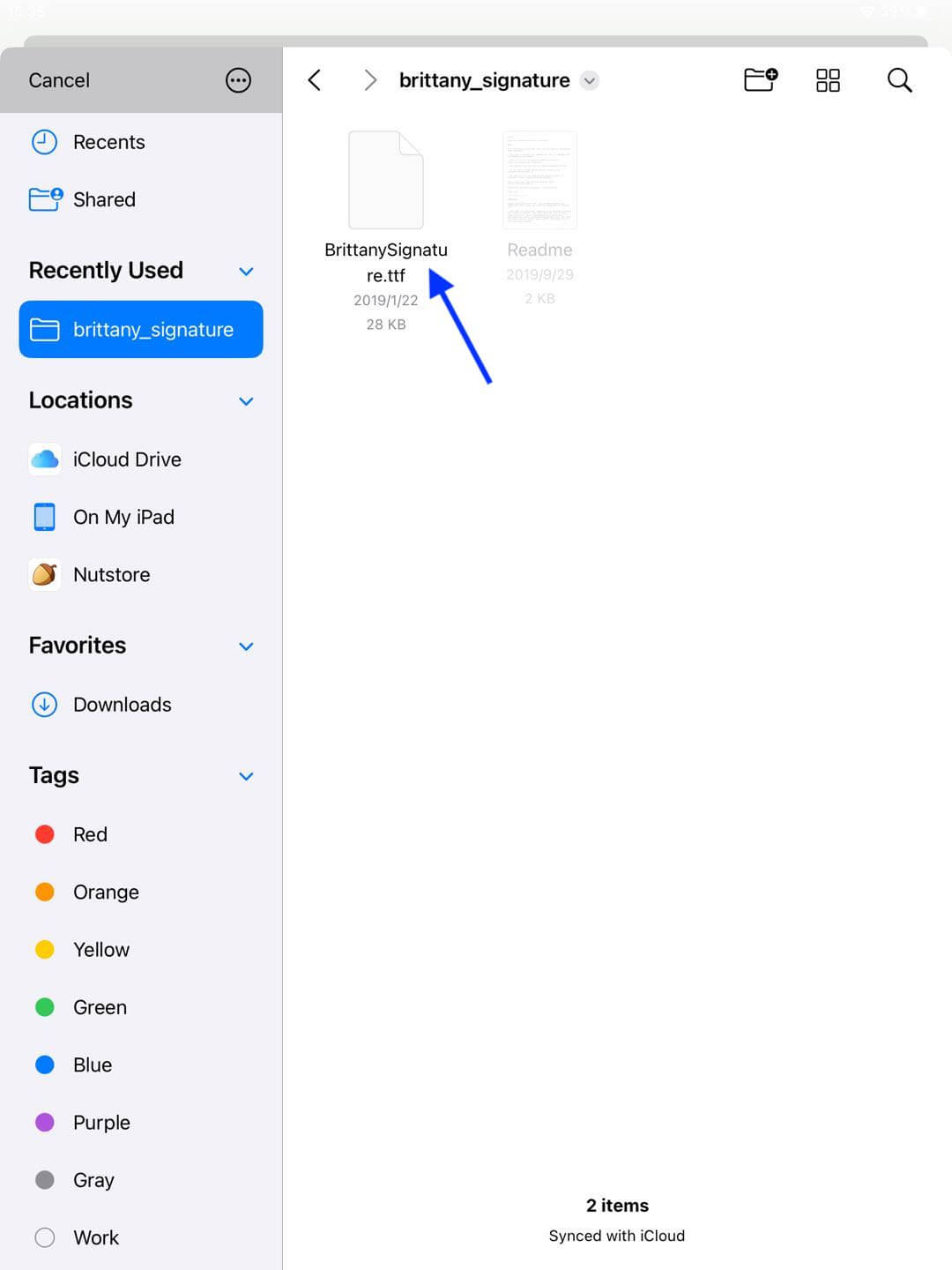
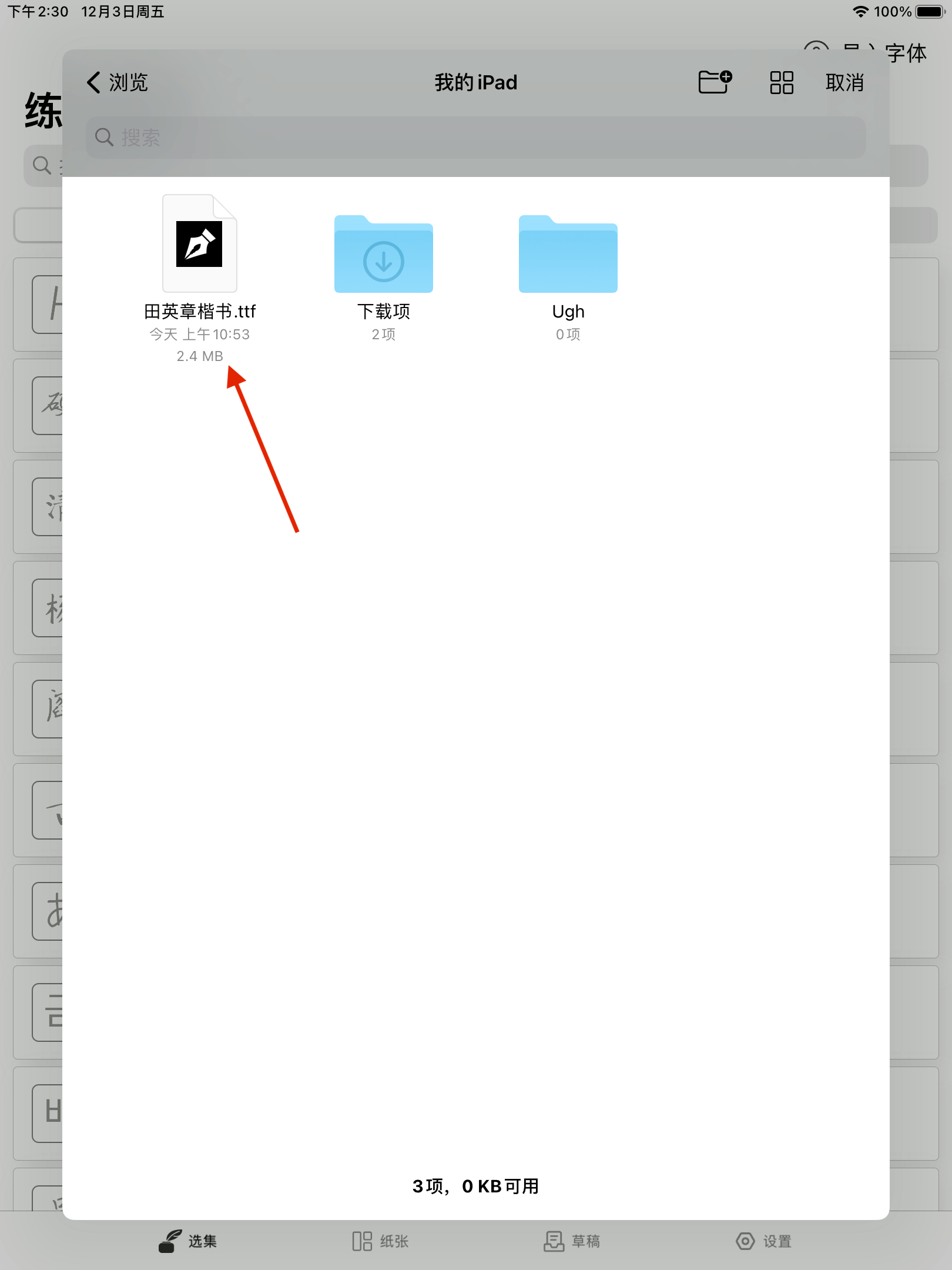
<p>You can find and select any font files by browsing the local files
<img src="https://calligraphymasteren.s3.us-east-2.amazonaws.com/lzds_tips/calligraphy_8.jpeg" alt="exmaple.png" /></p>]]></content><author><name>GitHub User</name></author><summary type="html"><![CDATA[Font Import Tutorial • Caution: The App currently only supports importing fonts in .ttf format • Download fonts via browser: Step 1: Open any font website and download the desired font file]]></summary></entry><entry><title type="html">字体导入教程</title><link href="/2021/12/03/import-help.html" rel="alternate" type="text/html" title="字体导入教程" /><published>2021-12-03T00:00:00+08:00</published><updated>2021-12-03T00:00:00+08:00</updated><id>/2021/12/03/import-help</id><content type="html" xml:base="/2021/12/03/import-help.html"><![CDATA[<h1 id="字体导入教程">字体导入教程</h1>
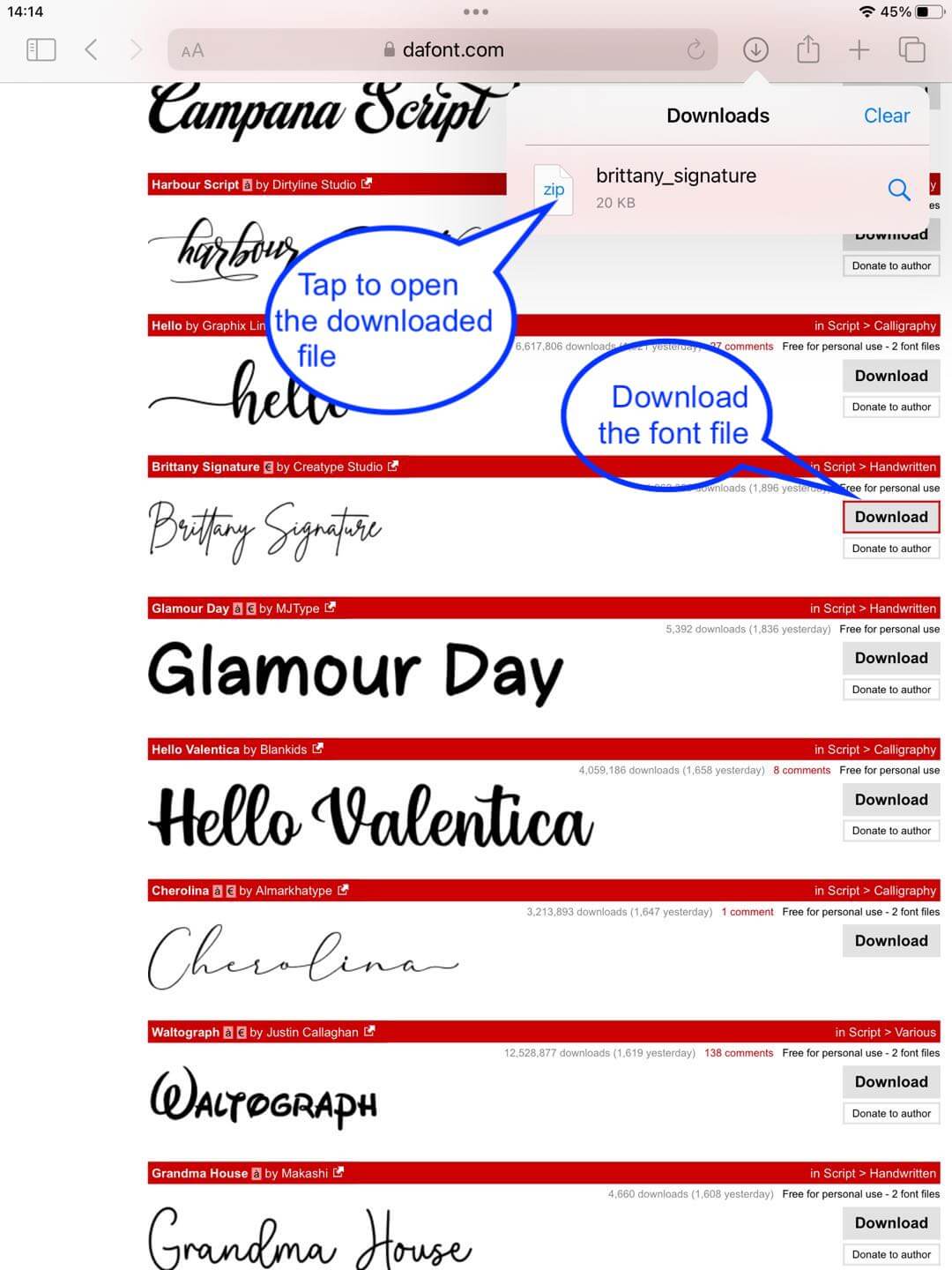
<p>• 注意：目前练字大师APP只支持导入 <strong>.ttf</strong>格式的字体文件</p>
<h2 id="-浏览器下载字体">• 浏览器下载字体：</h2>
<h3 id="第一步浏览器访问任意字体资源网站下载字体文件">第一步，浏览器访问任意字体资源网站，下载字体文件</h3>

<p><img src="https://pjresouce.oss-cn-hangzhou.aliyuncs.com/importHelp/1.png" alt="exmaple.png" /></p>

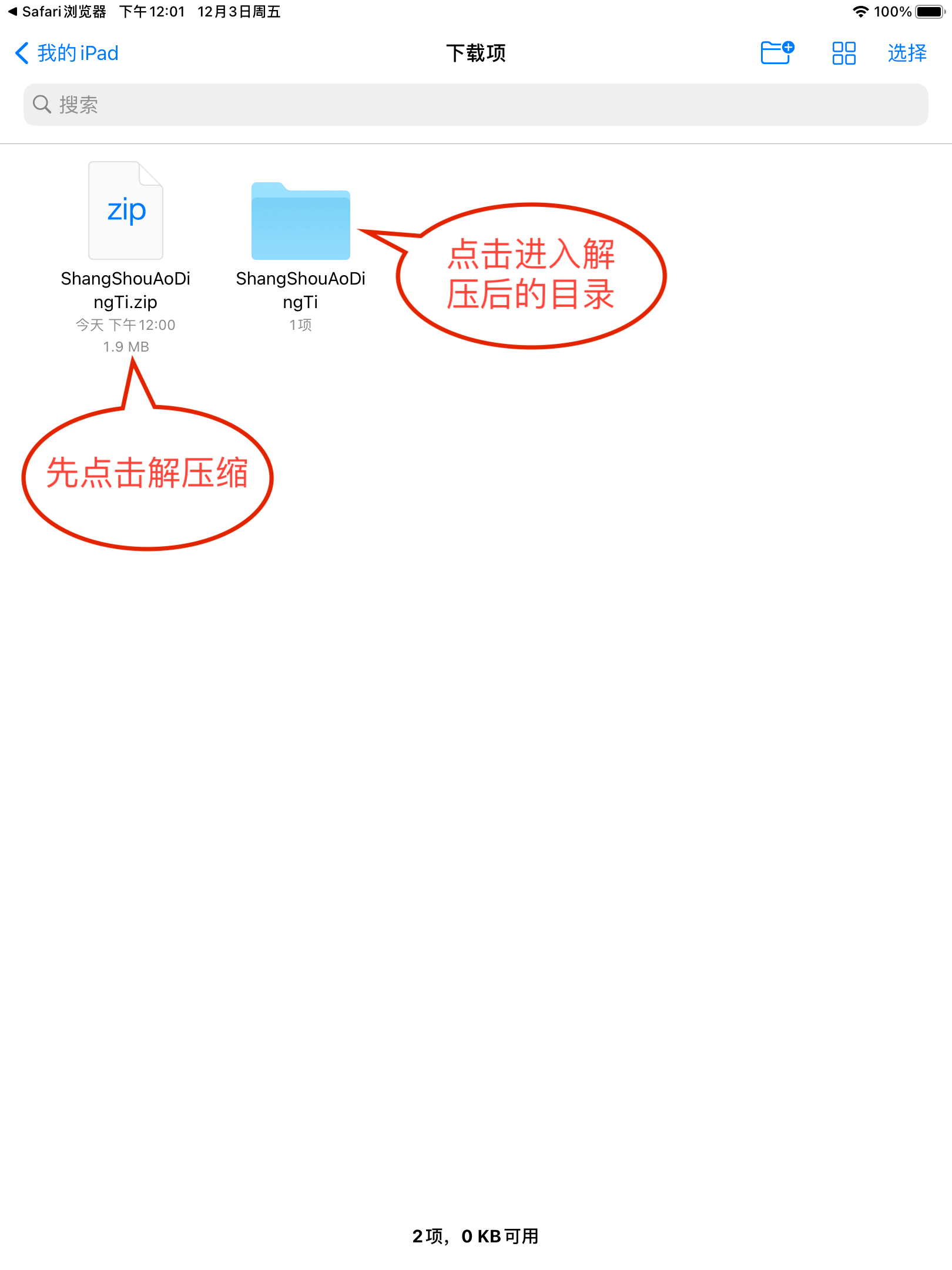
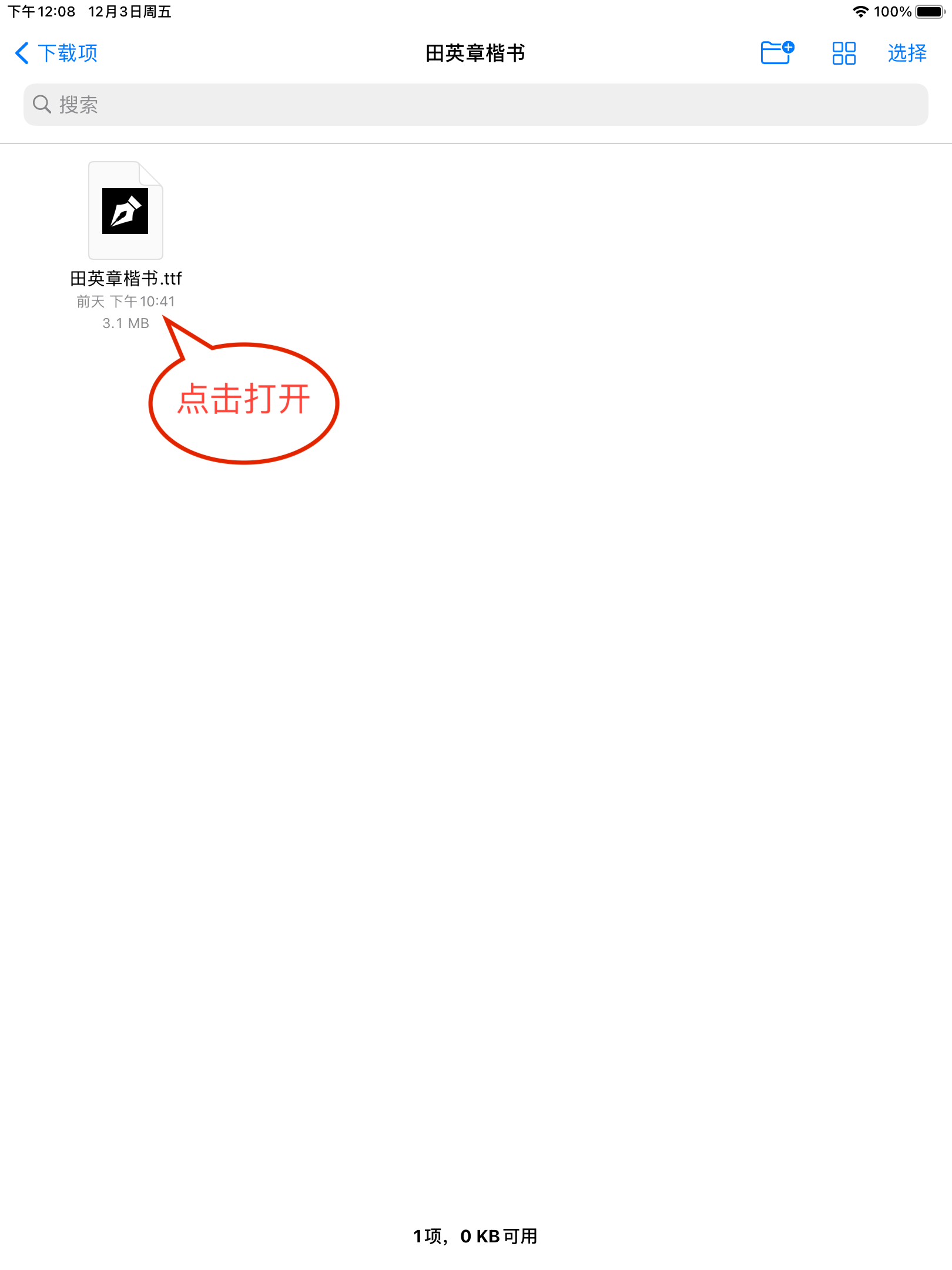
<p>系统将使用 <strong>“文件”APP</strong>打开，如果下载文件是zip压缩包，点击后系统会先解压缩，请点击进入解压缩后的目录</p>

<p><img src="https://pjresouce.oss-cn-hangzhou.aliyuncs.com/importHelp/1.1.png" alt="exmaple.png" /></p>

<h3 id="第二步用练字大师app打开字体文件">第二步，用练字大师APP打开字体文件</h3>

<p><img src="https://pjresouce.oss-cn-hangzhou.aliyuncs.com/importHelp/2.png" alt="exmaple.png" /></p>

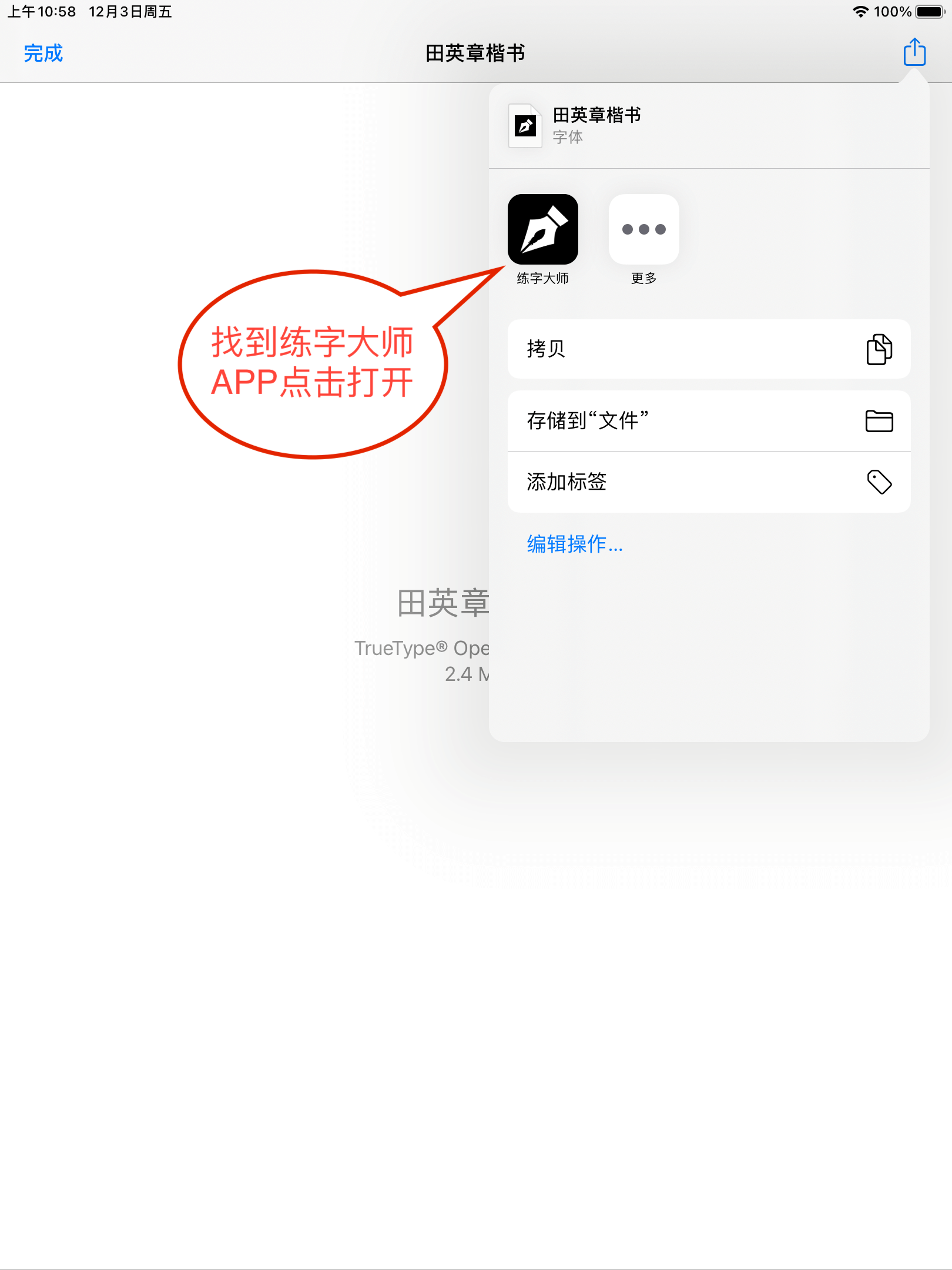
<p>在右上角的菜单中找到<strong>练字大师APP</strong></p>

<p><img src="https://pjresouce.oss-cn-hangzhou.aliyuncs.com/importHelp/2.1.png" alt="exmaple.png" /></p>

<h3 id="第三步编辑字体信息">第三步，编辑字体信息</h3>

<p>练字大师APP读取字体文件后会进入编辑页面</p>

<p><img src="https://pjresouce.oss-cn-hangzhou.aliyuncs.com/importHelp/3.png" alt="exmaple.png" /></p>

<p>编辑完成后点击<strong>确认导入</strong>，返回首页即可看到导入的字体</p>

<p><img src="https://pjresouce.oss-cn-hangzhou.aliyuncs.com/importHelp/4.png" alt="exmaple.png" /></p>

<h2 id="-练字大师app可随时打开本地已存在的-ttf-字体文件">• 练字大师APP可随时打开本地已存在的 <strong>.ttf</strong> 字体文件</h2>

<p>点击<strong>导入字体</strong>
<img src="https://pjresouce.oss-cn-hangzhou.aliyuncs.com/importHelp/5.png" alt="exmaple.png" /></p>

<p>浏览本地文件，找到并点击任意字体文件即可
<img src="https://pjresouce.oss-cn-hangzhou.aliyuncs.com/importHelp/6.png" alt="exmaple.png" /></p>]]></content><author><name>GitHub User</name></author><summary type="html"><![CDATA[字体导入教程 • 注意：目前练字大师APP只支持导入 .ttf格式的字体文件 • 浏览器下载字体： 第一步，浏览器访问任意字体资源网站，下载字体文件]]></summary></entry></feed>